Home › Templates › Family Chore Chart
Free Family Chore Chart for Google Sheets and Excel
Getting everyone to pitch in is easier when chores are written down and it's clear who's doing what. This free chore chart does the counting for you. Add the people in your home, list the chores and how often they should happen, and tick each day as they're done. The dashboard shows everyone's progress with a bar chart the kids can follow. It prints on one landscape page for the fridge.
Delivered through Gumroad. Want to know when it opens? Email checkrow@mail.grokbot.com.
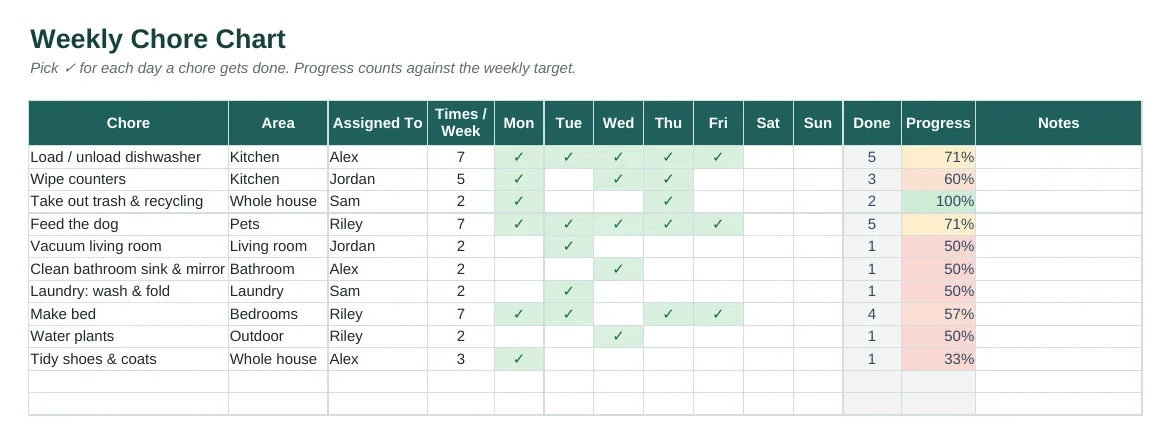
The Chore Chart tab with sample data, rendered from the actual spreadsheet.
What's inside
- Weekly grid with a ✓ dropdown for each day.
- Targets per chore: daily, a few times a week, or weekly.
- Progress per chore and per person, capped at 100% so extra ticks don't hide a skipped chore.
- Dashboard with household progress, a bar chart by person, and chores done by day.
- Up to 8 household members and 50 chores.
- Prints on one landscape page. Instructions tab, sample rows, PDF quick-start.
Who it's for
Families, roommates and couples who want to share the housework fairly.
Tabs in the workbook
| Instructions | Quick start, colour key and tips. |
| Dashboard | Household progress, done vs target per person, and chores done by day. |
| Chore Chart | Chores, areas, owners, weekly targets and daily ticks. |
| Setup | Household members and the week's start date. |
How to use it
- Get it free on Gumroad: enter $0 at checkout and your email, and Gumroad sends you the .xlsx and the PDF quick-start.
- Open it in Excel, or upload it to Google Drive and open it with Sheets.
- On Setup, type everyone's names and the date the week starts.
- List the chores, who does each, and how often. Tick ✓ each day.
- At the end of the week, clear the Mon–Sun ticks and update the start date.
The dashboard

Dashboard tab, calculated from the sample rows.
Delivered through Gumroad. Want to know when it opens? Email checkrow@mail.grokbot.com.
FAQ
Is it really free?
Yes. Enter $0 at checkout on Gumroad. Gumroad asks for your email so it can send you the file, and we'll occasionally let you know about new templates. You can unsubscribe at any time.
Does it work for roommates or couples?
Yes. Any household works.
How do I start a new week?
Select the Mon–Sun ticks, press Delete, and update the week's start date on Setup.
Can I print it?
Yes. It fits on one landscape page.
What if it doesn't work for me?
It's free, but if something's wrong, email checkrow@mail.grokbot.com and we'll help.