Home › Templates › Wedding Planner & Budget
Wedding Budget Spreadsheet and Planner for Google Sheets and Excel
Wedding planning is a lot of moving parts: a budget that keeps changing, a guest list that keeps growing, vendors to compare and pay, and a timeline to keep up with. This wedding planner spreadsheet keeps all of it in one workbook. Set your date and budget, and the dashboard counts down the days, shows what's committed and what's left, totals spending by category, and keeps RSVP and meal counts ready for your caterer.
Delivered through Gumroad. Want to know when it opens? Email checkrow@mail.grokbot.com.
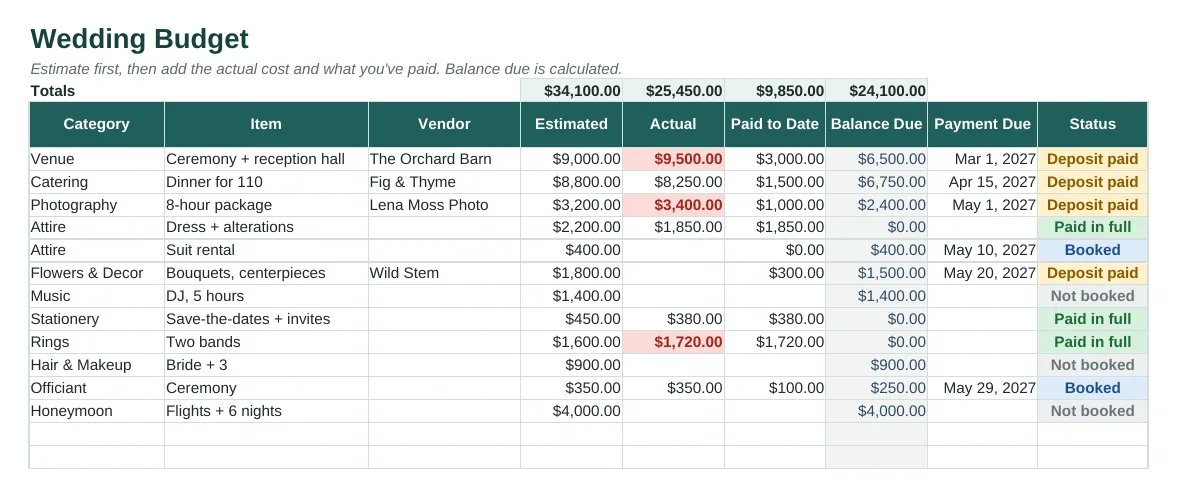
The Budget tab with sample data, rendered from the actual spreadsheet.
What's inside
- Budget: estimated vs. actual cost, paid to date, balance due and due date for every item, by category (venue, catering, attire, photography, flowers and more). Status runs from Not booked to Paid in full.
- Automatic highlights for overruns and for payments due within 14 days.
- Guest list for up to 300 guests: household, side, group, address/contact, invite sent, RSVP, meal choice, dietary notes and table number.
- Meal counts for attending guests, ready to send to your caterer.
- Vendor tracker for comparing quotes, booking stage and contract status.
- 20-task planning checklist from 12 months out to thank-you notes, with overdue tasks in red.
- Dashboard: countdown, budget left, spending by category, RSVPs, meals and checklist progress.
- Instructions tab, sample rows, dropdowns, PDF quick-start.
Who it's for
Couples planning their own wedding, and friends or family helping with the planning.
Tabs in the workbook
| Instructions | Quick start, colour key and tips. |
| Dashboard | Countdown, budget left, spending by category, RSVPs, meals and checklist progress. |
| Budget | Every cost with estimate, actual, paid to date, balance and due date. |
| Guests | Up to 300 guests with RSVP, meal, dietary notes and table. |
| Vendors | Contacts, quotes, booking stage and contract status. |
| Checklist | A starter timeline you can edit, with overdue tasks in red. |
How to use it
- Buy and download from Gumroad. Open it in Excel, or upload it to Google Drive and open it with Sheets so you can share it with your partner.
- Enter your wedding date and total budget.
- Replace the sample budget lines with your own estimates, and update actual costs and payments as you book.
- Add guests, mark invites sent, and update RSVPs and meals as replies come in.
- Work through the checklist and keep an eye on the Dashboard for payments due.
The dashboard

Dashboard tab, calculated from the sample rows.
Delivered through Gumroad. Want to know when it opens? Email checkrow@mail.grokbot.com.
FAQ
Can both of us edit it at the same time?
Yes, if you use Google Sheets. Upload your copy, then share it with your partner from the Share button.
Can I change the budget categories?
Yes. The Instructions tab explains how to rename them.
Does it do a seating chart?
It has a table-number column for each guest, so you can sort and filter by table. It doesn't draw a seating plan.
Can I change the currency from US dollars?
Yes. Select the money columns, then Format > Number > Currency.
Is there a free version?
The planner is $12. The free Family Chore Chart shows you how Checkrow templates work.
What if it doesn't work for me?
If a template doesn't work for you, email checkrow@mail.grokbot.com within 30 days of purchase for a full refund, no questions asked.