Home › Templates › Job Application Tracker
Job Application Tracker for Google Sheets and Excel
When you're sending out dozens of applications, it's easy to lose track of where you applied, what stage you're at, and who you promised to follow up with. This job application tracker template keeps your whole job search in one spreadsheet. Log each role, move it from Wishlist to Offer with a dropdown, record every interview round, and let the sheet flag follow-ups on the day they're due. The dashboard shows your pipeline, which sources lead to interviews, and how many thank-you notes you still owe.
Delivered through Gumroad. Want to know when it opens? Email checkrow@mail.grokbot.com.
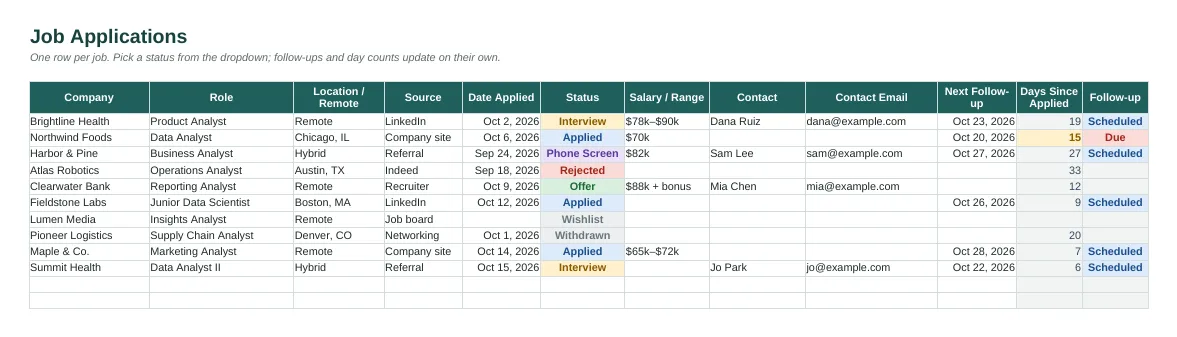
The Applications tab with sample data, rendered from the actual spreadsheet.
What's inside
- Applications tab: company, role, source, dates, status, salary range, contact and link. One row per job, with room for 200 applications.
- Colour-coded status dropdown: Wishlist, Applied, Phone Screen, Interview, Offer, Rejected, Withdrawn.
- Follow-up column that shows Due in red when a follow-up date arrives.
- Days-since-applied counter that highlights applications waiting 14+ days.
- Interview log: round (recruiter call to final), format, interviewers, outcome, and whether you sent a thank-you.
- Dashboard: pipeline by status, source performance (LinkedIn, Indeed, referral, recruiter and more), and follow-ups due.
- Instructions tab, sample rows, frozen headers and filters, plus a PDF quick-start.
Who it's for
Anyone applying to more than a handful of jobs: new grads, career changers, and people job hunting while still working.
Tabs in the workbook
| Instructions | Quick start, colour key and tips. |
| Dashboard | Totals, pipeline by status, which sources work and reminders. |
| Applications | One row per job: company, role, source, dates, status, contact and link. |
| Interviews | Each round with date, format, outcome and whether you sent a thank-you. |
How to use it
- Buy and download from Gumroad. Open the .xlsx in Excel, or upload it to Google Drive and open it with Sheets.
- Read the Instructions tab, then delete the sample rows.
- Add a row for each job, starting at Wishlist, and change the status as things move.
- Log each interview round on the Interviews tab, and tick off thank-you notes.
- Check the Dashboard each morning for follow-ups that are due.
The dashboard

Dashboard tab, calculated from the sample rows.
Delivered through Gumroad. Want to know when it opens? Email checkrow@mail.grokbot.com.
FAQ
Does it work in Google Sheets and Excel?
Yes, and in LibreOffice too. It's one .xlsx file.
Does it send me reminder emails?
No, spreadsheets can't send email on their own. Instead, the Follow-up column turns red and says Due when the date arrives, and the Dashboard counts how many are due.
Can I track recruiters and referrals?
Yes. Each application has contact name and email columns, and the Source dropdown includes Recruiter and Referral, so you can see which channels lead to interviews.
Will it work for internships?
Yes. Any role you apply for fits.
Is there a free version?
This tracker is $7. If you'd like to try a Checkrow template first, the Family Chore Chart is free and uses the same layout.
What if it doesn't work for me?
If a template doesn't work for you, email checkrow@mail.grokbot.com within 30 days of purchase for a full refund, no questions asked.