Home › Templates › Student Assignment & Grade Tracker
Assignment and Grade Tracker for Google Sheets and Excel
With several classes, each on its own syllabus, deadlines sneak up fast. This assignment tracker template gives you one list of everything that's due. Add your classes and every assignment once, and the tracker shows what's due this week, what's overdue and how each course is going. Enter scores as they come back, and your weighted grade for each class updates using the weights from your syllabus.
Delivered through Gumroad. Want to know when it opens? Email checkrow@mail.grokbot.com.
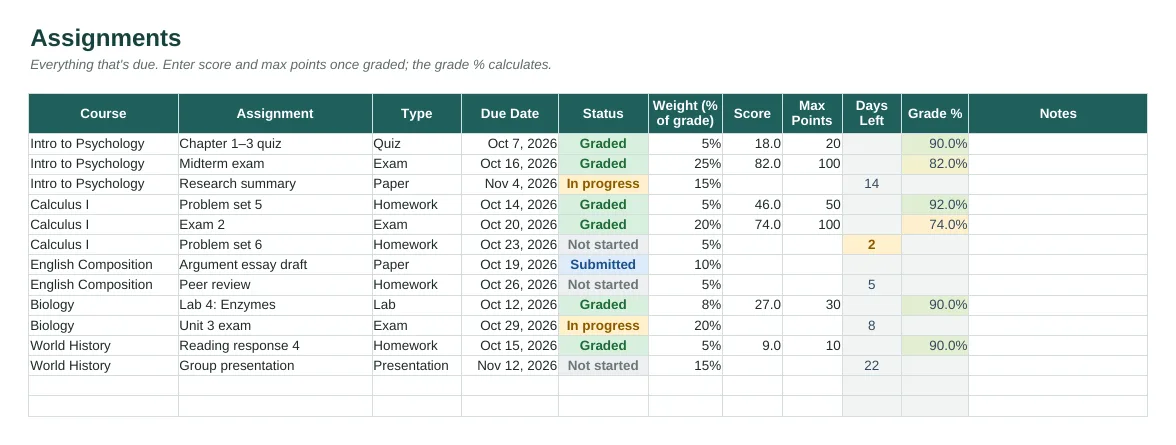
The Courses tab with sample data, rendered from the actual spreadsheet.
What's inside
- Assignments tab: course dropdown, type, due date, status, weight, score and grade %. Room for 300 assignments.
- Days Left countdown that turns amber at 3 days and red when overdue.
- Weighted current grade per course, compared with your target grade.
- Courses tab for up to 20 classes, with credits, target grade and open tasks.
- Average grade by assignment type (exams, homework, labs and more).
- Dashboard: what's due in the next 7 days, overdue work, completion and grades by course.
- Instructions tab, sample rows, PDF quick-start.
Who it's for
High school, college and grad students, and parents helping a student stay organised.
Tabs in the workbook
| Instructions | Quick start, colour key and tips. |
| Dashboard | What's due this week, overdue work, completion and grades by course. |
| Courses | Classes, credits, target grade, current weighted grade and open tasks. |
| Assignments | Every assignment with due date, status, weight, score and grade %. |
How to use it
- Buy and download from Gumroad. Open it in Excel, or upload it to Google Drive and open it with Sheets (works on a Chromebook).
- Add your courses and your target grade for each.
- Copy every assignment and due date from each syllabus, with the weight from the syllabus.
- Update the status as you go, and enter scores as they come back.
- Check the Dashboard each week for what's due in the next 7 days.
The dashboard

Dashboard tab, calculated from the sample rows.
Delivered through Gumroad. Want to know when it opens? Email checkrow@mail.grokbot.com.
FAQ
How is the current grade calculated?
It's a weighted average of the assignments graded so far, using the Weight column (each assignment's share of the final grade from your syllabus). Ungraded work isn't counted yet.
Does it work for points-based classes?
Yes. Enter each assignment's points as Score and Max Points, and set the weight to its share of total points.
Is it for college or high school?
Both, and grad school too.
Can I reuse it next semester?
Yes. Keep the original download and start each term from a fresh copy.
Is there a free version?
The tracker is $6. The Family Chore Chart is free if you'd like to try the Checkrow layout first.
What if it doesn't work for me?
If a template doesn't work for you, email checkrow@mail.grokbot.com within 30 days of purchase for a full refund, no questions asked.